
This is the print version of this page. All content is copyright Indezine.com 2000-2026.
Info-things on PowerPoint usage including tips, techniques and tutorials.
See Also:
PowerPoint and Presenting Notes
PowerPoint and Presenting Glossary
Did you receive a PowerPoint presentation, and now you have been asked to make edits to the PowerPoint slides within Google Slides? Why? It could be that you no longer have access to PowerPoint. It may also be that the program used to work with slides in your organization or educational institution is Google Slides, and you are expected to work within that program.
While PowerPoint is certainly the de facto standard for presentation slides, you may have umpteen reasons to work with Google Slides and also may need to open PowerPoint slides in Google’s presentation program to either view slides or to edit them. You may even have to save the slides in Google Slides’ native format and that’s something we will explore later on this page. Whatever your objective may be, you will first need to open your PowerPoint presentation in Google Slides as the first step.
The answer to that question is neither yes nor no. Answers may depend on your usage scenario, and beginner presentation users may find that Google Slides does have all the features they need. Also, while Google’s presentation program allows you to import PowerPoint presentations, it doesn’t support all features and effects of PowerPoint. In many ways, you will have to decide what works best for you.
Finally, it is true that Microsoft’s presentation program has many more features, and PowerPoint for the Web is something that’s more similar in breadth and features with Google Slides.
In this article, we will look at three ways to open a PowerPoint presentation in Google Slides. These are the three methods we will explore:
Filed Under:
Techniques
Tagged as: Convert, Google Slides, PowerPoint, Tutorials
Comments Off on How to Open a PowerPoint Presentation in Google Slides?
Original content by AlexAnndra Ontra and James Ontra
Enhanced by Geetesh Bajaj
In the previous part of this Presentation Management series of posts, we explored how creating a story for a business presentation is different than constructing other stories. In this part, we look at how you can organize content to make your business story interesting.
Filed Under:
Guest Post
Tagged as: AlexAnndra Ontra, Geetesh Bajaj, James Ontra, Presentation Management
Comments Off on Presentation Management 25: Content Organization
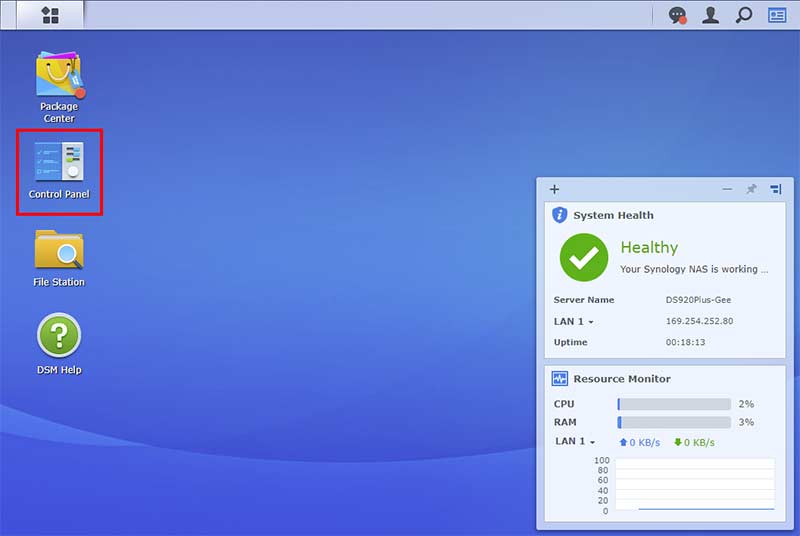
In our previous post, we explored how we can add users for a Synology NAS device. In this post, we will take stock of how many users we have, add users, or remove them altogether. You may also want to edit permissions for existing users. In all cases, you’ll need to have admin access to your Synology DSM.
Follow these steps to explore along:
Filed Under:
Hardware
Tagged as: Hardware, Storage, Synology
Comments Off on Edit and Delete Users on the Synology DS920+
Here’s a question from a reader: I’m trying to replace the MS Mincho font used in my PowerPoint presentation with another font, but PowerPoint won’t allow me to do so. What are my options?
Although this seems like a simple question, there are many factors that could be at play here. Let’s explore them, one by one.
Although the question asked by the reader was about MS Mincho, you can use the guidelines and ideas shared in this post for any other font.
Filed Under:
Troubleshooting
Tagged as: Fonts, Replace Fonts, Troubleshooting
Comments Off on Replace MS Mincho and Other Double-byte Fonts
By Steve Rindsberg and Geetesh Bajaj
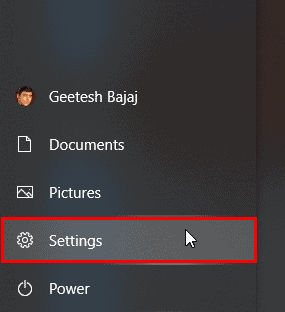
There are many reasons why you may need to install another language in Microsoft Windows. You may need to use a font in another language or you may have a larger need. Whatever the reasons may be, it’s easy to add another language. We are using Windows 10, but the process should work similarly in other versions of Windows.
Follow these steps to get started:
Filed Under:
Techniques
Tagged as: Geetesh Bajaj, Language, Steve Rindsberg, Tutorials
Comments Off on Install Another Language in Windows 10
Microsoft and the Office logo are trademarks or registered trademarks of Microsoft Corporation in the United States and/or other countries.