
This is the print version of this page. All content is copyright Indezine.com 2000-2026.
Info-things on PowerPoint usage including tips, techniques and tutorials.
See Also:
PowerPoint and Presenting Notes
PowerPoint and Presenting Glossary
Original content by AlexAnndra Ontra and James Ontra
Enhanced by Geetesh Bajaj
In the last part of this Presentation Management series of posts, we looked at the lifecycle of a presentation, including its creation. In this part, we look at another aspect of a presentation’s life cycle: its distribution.
Yes, you or someone else created the presentation content. That brings forth some questions:
These questions are all related to distribution in presentation management. Now, let us answer the questions one at a time.
The content is wherever you save it. It could be on individual computers, a company network, or even on individual cloud accounts. None of these scenarios are ideal because they prevent access to many who need to use the content.
The best solution is to host the content on the cloud because that’s where users can get to it, whether they are sitting inside corporate headquarters or working from home.
Most of our clients subscribe to our hosting service. But there are a few who prefer to keep their content on the premises, in which case they install Shufflrr on their own cloud. The goal is to make sure users can get content, anywhere, anytime, from any device. There’s nothing more frustrating than sitting down at your desk to get some work done only to realize that you are locked out for some dumb reason.
– AlexAnndra Ontra and James Ontra, Shufflrr
Access begins with logging into the slide library. Users then find content through search and visualization. The quality of the slide library, visualization, content hierarchy, search, and permissions will affect the ease or the difficulty with which users can successfully find what they need.

Filed Under:
Guest Post
Tagged as: AlexAnndra Ontra, Distribution, Geetesh Bajaj, Guest Post, James Ontra, Presentation Management, Shufflrr
Comments Off on Presentation Management 19: Distribution
Videos are everywhere. How many people read recipes rather than viewing recipe videos on YouTube? How many people want to buy a book to learn how to use a cool new PowerPoint feature rather than watching a demo in a video? The answers are obvious: everyone these days would rather watch a video than reading or just listening because videos are more than reading and listening–they also encompass showing!
And that’s the reason why many users, including first-time video-creators, are looking for a video editing software that’s not going to burn a hole in their pockets, but still, be capable to create and capture their ideas. If the video editing software is easy to use, that’s an amazing bonus. So, let us see if our review product for today, EaseUS Video Editor fulfills these requirements?
My contact at EaseUS for this review was Miley Shen. Thank you for coordinating, Miley.
You can download the installer for EaseUS Video Editor from the EaseUS site. If you have already bought a full-licensed version, the link to the installer can also be found in the email you received after buying. Alternatively, if you want to test the video editing software from EaseUS before making a decision, they provide a fully-working trial version that you can again download from their site.
Once you install and run EaseUS Video Editor, the first screen you see is shown in Figure 1, below. You need to choose whether you want to create a 9:16 Portrait video, a 16:9 Widescreen video, or a 4:3 Traditional video. We chose the 16:9 Widescreen video option.
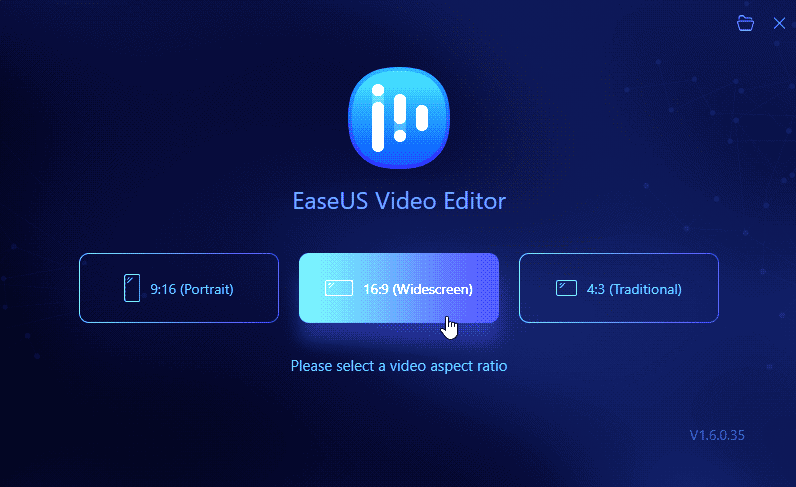
Figure 1: EaseUS Video Editor Launch Screen
Comments Off on EaseUS Video Editor: The Indezine Review
We last reviewed iSpring Suite 8 in 2016, and it’s been a while since then. During this time, the folks at iSpring have added a multitude of features to their flagship program, and it seems like a good time to review the new iSpring Suite 9.7.
My contact at iSpring Solutions Inc. for this review was Maria Varankina. Thank you for coordinating, Maria.
You can download the installer for iSpring Suite from the iSpring site. If you have already bought a full- licensed version, the link to the installer can be found within your account on the iSpring site. Alternatively, if you want to test the product before making a decision, iSpring provides a fully-working 14-day trial version that you can again download from their site.
Once the installation is completed, you will be surprised to see the sheer breadth of programs installed. I found 12 shortcuts in the iSpring Suite 9 folder in the Windows Start menu, as can be seen in Figure 1, below.
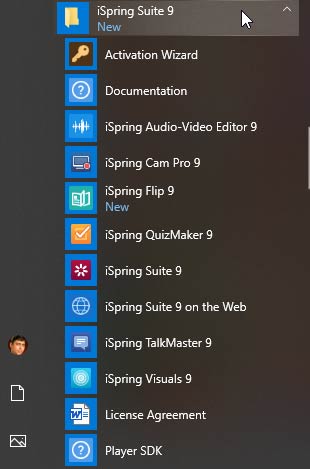
Figure 1: iSpring 9 Start menu group
Filed Under:
Add-ins
Tagged as: Add-in, eLearning, iSpring, Review
Comments Off on iSpring Suite 9.7: The Indezine Review
Original content by AlexAnndra Ontra and James Ontra
Enhanced by Geetesh Bajaj
In the last part of this Presentation Management series of posts, we looked at strategies to collect and use the content for presentation management. In this part, we look at the life cycle of a presentation, which can be surprisingly much longer and more expansive than what many of us imagine.
Our presentations never finish, says Bob Davis, associate vice president of marketing for HealthTrust Purchasing Group, the purchasing division for HCA Healthcare, which operates 178 hospitals and 119 surgical centers throughout the United States and the United Kingdom.
In presentation management, files are never done. Instead, they evolve, just like the businesses they represent. Slides and decks continually morph and adjust to the market and to the world in which the business operates. The companies and organizations that get the most out of presentation management evolve their content through a constant lifecycle – or what we call The Wheel.
The Wheel looks like this:

Filed Under:
Guest Post
Tagged as: AlexAnndra Ontra, Geetesh Bajaj, Guest Post, James Ontra, Presentation Management, Shufflrr
Comments Off on Presentation Management 18: Lifecycle of a Presentation
There are two reasons for converting a PDF to an editable PowerPoint file:
To work conventionally in any of the two situations mentioned above is a long process. You will have to manually copy and paste, and even then, the results will be far from satisfactory. You clearly need a better option to resolve this problem. Fortunately, the subject of our review today is CleverPDF, a product that can achieve surprisingly great results with good fidelity in the converted PowerPoint file. Even better, there’s nothing to install because CleverPDF can work in your web browser. And we haven’t told you the best part: this entire program is free.
For this review, my contact at CleverPDF was Terry Kam. Thank you, Terry, for patiently responding with answers to my many questions.
Filed Under:
Reviews
Tagged as: Convert, PDF, PowerPoint
Comments Off on CleverPDF’s PDF to PowerPoint Conversion
Microsoft and the Office logo are trademarks or registered trademarks of Microsoft Corporation in the United States and/or other countries.