
This is the print version of this page. All content is copyright Indezine.com 2000-2026.
Info-things on PowerPoint usage including tips, techniques and tutorials.
See Also:
PowerPoint and Presenting Notes
PowerPoint and Presenting Glossary
I got this question from someone who works in a institution that has students with disabilities: How can I set up PowerPoints so that when the mouse is held down, the slides do not trip through whole presentation. I work with students with disabilities who sometimes find this difficult.
The answer is to change the mode in which PowerPoint plays the presentation. You can access the settings to make these changes through the Set Up Slide Show dialog box, accessed differently depending upon the version of PowerPoint you use:
Either way, you end up bringing up the Set Up Show dialog box that you can see in Figure 1, below.
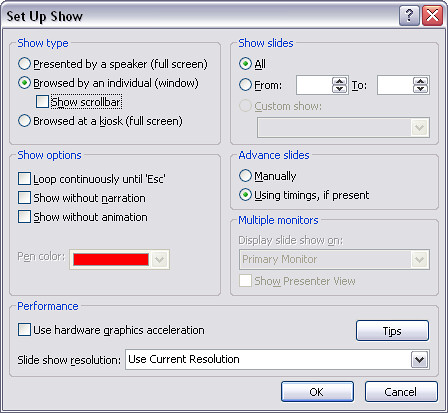
Figure 1: Set Up Show
At the top right of this dialog, you’ll need to select the Browsed by an individual (window) option — and you can also decide whether you want the Show scrollbar option checked. Click OK when done, and save your presentation.
Here are some thoughts, caveats, and observations to be aware of:
Filed Under:
Uncategorized
Tagged as: Basics, Edit, PowerPoint, Show
Comments Off on Prevent Mouse-clicks from Advancing Slides
A friend sent me this question: I want to make one slide .PPS file. On click, or on pressing any key the .PPS file should exit or close. Can this be done?
Yes, it can — it’s easier to do this on click rather than by pressing any key. Follow these steps:
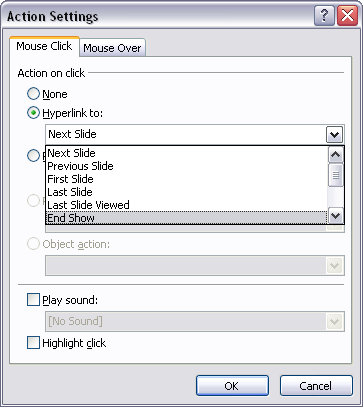
Figure 1: Action Settings
Users of previous PowerPoint versions can double click the rectangle to summon the Format AutoShape dialog box. In this multi-tabbed dialog box, select the Colors and Lines tab, then under the Color dropdown list, drag the Transparency slider to 99%. In the Line Color dropdown list, choose the No Line option. Click OK to get back to the slide.
Filed Under:
Uncategorized
Tagged as: End, PowerPoint, Show
Comments Off on One Click To Close
Question: The problem I am having is that the Arial font size that I save as 32 for visibility, changes to 24 the next time I pull the presentation up. I have looked at the save options and nothing has helped. Do you have any suggestions?
Answer: This might help:

Figure 1: Tweak AutoCorrect options
– AutoFit title text to placeholder
– AutoFit body text to placeholder
– Automatic layout for inserted objects
Filed Under:
Uncategorized
Tagged as: Options, PowerPoint
Comments Off on Stop Font Sizes from Changing
This quick tutorial was provided with George McCaskill of Visual Exemplars, a UK based company that creates Perspector, a 3D add-in for PowerPoint.

Figure 1: A Perspector 3D list.

Figure 2: A Perspector list with PowerPoint 2007 effects.
Filed Under:
Uncategorized
Tagged as: Perspector, PowerPoint 2007
Comments Off on 3D Lists in PowerPoint 2007 with Perspector 4.0
This article is not about creating your own macros or scripts to automate PowerPoint. However, if you just want to run any macros or scripts that a friend or colleague shares, then you are on the right page. You can also get many scripts from our PowerPoint VBA Snippets page.
Follow these steps to get started:
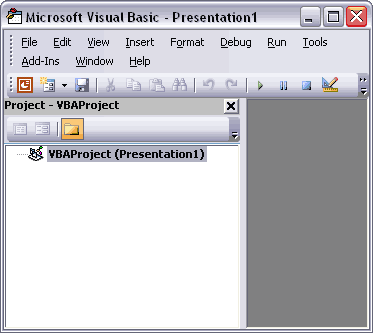
Figure 1: The Visual Basic interface

Figure 2: Insert a module
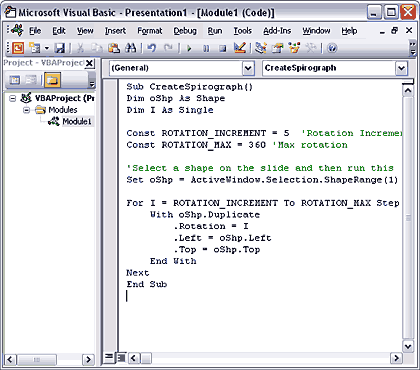
Figure 3: The pasted script

Figure 4: The Macro dialog box
Versions before PowerPoint 2007: Choose Tools | Macros | Macro option to bring up the same dialog box that you saw in Figure 4. Then select the script you want to run, and click the Run button.
Remember, some scripts may do nothing at all unless you have something selected on the slide before you run them!
Tip from Steve Rindsberg: You can store many, many macros/scripts/routines in a single PowerPoint file and as long as you have it open along with any other files, you can access the macros as described.
You May Also Like: Create an Add-in With Toolbars That Run Macros (PPT FAQ by Steve Rindsberg)
Filed Under:
Techniques
Tagged as: Macro, PowerPoint, Programming, VBA
Microsoft and the Office logo are trademarks or registered trademarks of Microsoft Corporation in the United States and/or other countries.