
This is the print version of this page. All content is copyright Indezine.com 2000-2026.
Info-things on PowerPoint usage including tips, techniques and tutorials.
See Also:
PowerPoint and Presenting Notes
PowerPoint and Presenting Glossary
Original content by AlexAnndra Ontra and James Ontra
Enhanced by Geetesh Bajaj
In the last part of this Presentation Management series of posts, we looked at how interactive presentations can help access content easily and quickly. In this post, we will explore better storytelling techniques that can make your presentations even more interesting and captivating.
Stories are powerful for communicating, teaching, motivating and learning. That’s because stories draw on emotion and scenarios that resonate with us on a visceral level. Better stories get people to act.

Filed Under:
Guest Post
Tagged as: AlexAnndra Ontra, Geetesh Bajaj, Guest Post, James Ontra, Presentation Management, Shufflrr
Comments Off on Presentation Management 13: Better Storytelling
Original content by AlexAnndra Ontra and James Ontra
Enhanced by Geetesh Bajaj
In the last part of this Presentation Management series of posts, we looked at how presentation management transforms content: employees create new content from existing content, and both internal and external usage of content gets easier. We will move ahead in this post and look at interactive presentations.
Let’s explore one facet of the pharmaceutical industry. The cost of creating a successful new drug is anywhere from $650 million to $2 billion. The price tag is so high because the hit rate is so low: 90 percent of drugs developed don’t make it to market. Few drugs make it through all three phases of clinical trials, and when they do, they still need to get FDA approval.

Filed Under:
Guest Post
Tagged as: AlexAnndra Ontra, Geetesh Bajaj, Guest Post, James Ontra, Presentation Management, Shufflrr
Comments Off on Presentation Management 12: Interactive Presentations
Original content by AlexAnndra Ontra and James Ontra
Enhanced by Geetesh Bajaj
In the last part of this Presentation Management series of posts, we looked at how presentation management balances both sides of the enterprise: the high-level corporate brand and objectives with the everyday tasks of the employees out in the field. In this post, we will take the concept further and explore how content gets transformed as a result of presentation management.
Once cloud storage, active files, slide libraries, visualization and search are up and running, anyone at your company can use it to build better presentations using the best content from your best people. And as that discipline spreads throughout your organization, you will notice some very interesting effects on the culture of presentations.
The old idea of one-and-done presentations fades away, and a new culture of reuse takes over. And the more a file and slide are reused, the more productive they become, and the higher the return on your content investment. Here are other ways the concept of presentations changes after the implementation of presentation management.
Filed Under:
Guest Post
Tagged as: AlexAnndra Ontra, Geetesh Bajaj, Guest Post, James Ontra, Presentation Management, Shufflrr
Comments Off on Presentation Management 11: How Presentation Management Transforms Content
Do you want to create Animated GIFs using PowerPoint? Now that Microsoft has finally added this feature to Office 365 versions of PowerPoint, you can create an Animated GIF from your PowerPoint slides effortlessly.
Here’s a quick walk-through video I created.
If you are creating a new presentation from scratch for the animated GIF, make sure that your PowerPoint slide proportions are exactly what you want. You can change these proportions by accessing the Design tab on the Ribbon, and then clicking the Slide Size button. Doing so will bring up the Slide Size drop-down menu you can see in Figure 1, below.
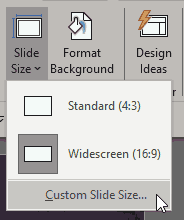
Figure 1: Slide Size drop-down menu
Filed Under:
New Features
Tagged as: Animated GIFs, New Features, Office 365, PowerPoint, PowerPoint 365
By Puneet Gogia
If you are a project manager then I’m sure you agree with me on this:
For a project manager, one of the most important things is to track the progress of the project.
Type “Yes” in the comment section, if you agree.
Well, there are a lot of charts and templates which you can use to track your projects, but one of my favorites is the Gantt Chart, which is also one of the popular charts. And if you are an aspiring project manager then it’s important for you to learn to create a Gantt chart in PowerPoint.
Here’s the thing, creating a chart directly in PowerPoint gives you an edge that you can present it anytime without any hassle.
So today, to help you with this, I’ll be sharing a step by step process to create a Gantt chart in PowerPoint.
Filed Under:
Guest Post
Tagged as: Charts, Excel, Puneet Gogia, Tutorials, VBA
Comments Off on How to Create a Gantt Chart Template in PowerPoint
Microsoft and the Office logo are trademarks or registered trademarks of Microsoft Corporation in the United States and/or other countries.