
This is the print version of this page. All content is copyright Indezine.com 2000-2026.
Info-things on PowerPoint usage including tips, techniques and tutorials.
See Also:
PowerPoint and Presenting Notes
PowerPoint and Presenting Glossary
Do you see charts with data labels that read [CELLRANGE] rather than a real value or number? Do you see this behavior more in PowerPoint slides you receive from others, rather than the slides you create yourself? This is a known bug and can affect users of PowerPoint 2010 and older versions if they open slides with charts created in PowerPoint 2013 and newer versions.
Look at this chart created in PowerPoint 2016 for Windows, as shown in Figure 1, below. You will notice that the data labels have been highlighted in red.
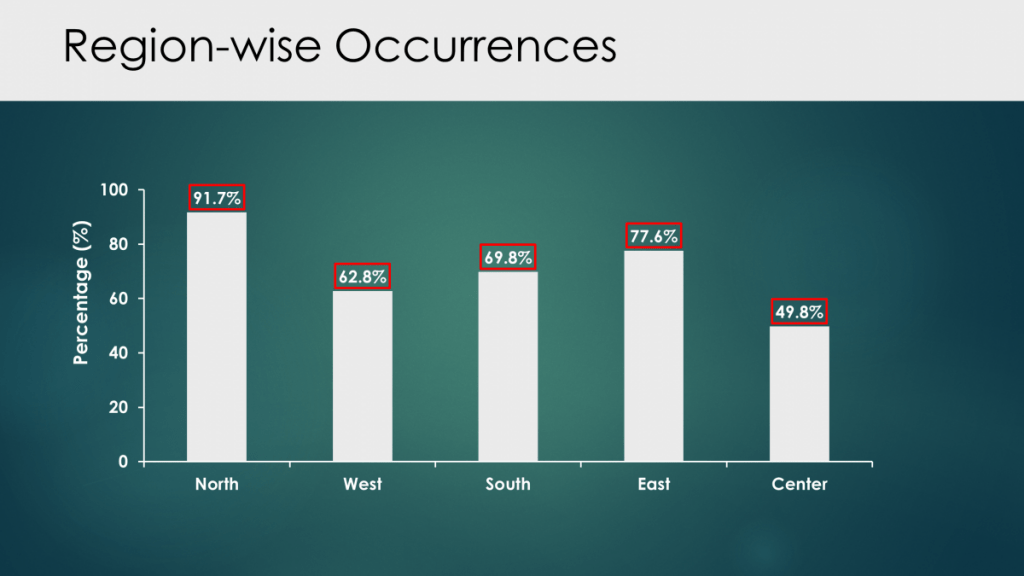
Figure 1: Slide with data labels in PowerPoint 2016 for Windows
Filed Under:
Troubleshooting
Tagged as: [CELLRANGE], Charts, Data Labels, Geetesh Bajaj, PowerPoint 2003, PowerPoint 2007, PowerPoint 2010, PowerPoint 2013, PowerPoint 2016
Comments Off on Data Labels Show [CELLRANGE] Rather Than the Expected Value or Number in PowerPoint Charts
An Indezine reader for many years, Pam reached out with a slightly long question:
Do you know why Microsoft offers both Widescreen and On-screen Show (16:9) options in the Slide Size dialog box? The difference, as you know, is the measurement in inches. Widescreen uses a Width x Height measurement of 13.333 x 7.5 inches, whereas On-Screen Show’s size is 10 x 5.63 inches. But does that difference actually mean anything? I’ve found, that once you go into Slide Show view, both settings use the same 16:9 aspect ratio and look exactly the same. So why do the actual inches matter? I don’t understand why both options are there.
So, here’s my answer: As you point out, the difference is in the measurement.
Filed Under:
Techniques
Tagged as: Question, Slide Size, Widescreen
Comments Off on Two Widescreen Sizes in PowerPoint?
There is a lot of confusing, incomplete, and often misleading information out there about choosing fonts in PowerPoint. Specifically, which fonts are considered safe to use when sharing files. Safe fonts are those that are common to most users and therefore will not be substituted when your PowerPoint file is opened with an operating system or Microsoft Office version that is different from your own. This is critical information for those who build templates, especially when the templates and presentations created with them will be shared around the world.
To be clear, you can choose other fonts for a template or presentation. You can instruct others to download fonts and install them on their system before opening or editing a file. Some fonts can be embedded and the latest versions of PowerPoint for Mac can recognize some fonts that were embedded on a Windows device. Each of these methods has caveats, though. First, many fonts cannot be embedded at all. Second, when sharing and viewing files with online storage sites like Dropbox, for instance, you have no ability to install fonts and embedded fonts will be substituted. Third, if your template will be distributed company-wide, can you be certain that everyone will embed fonts before sharing presentations? And finally, If you share files with clients, do you expect them to install fonts before opening a PPTX file?
Filed Under:
Guest Post
Tagged as: Fonts, Guest Post, Julie Terberg, PowerPoint, Safe Fonts, Techniques
Comments Off on An Update on “Safe Fonts” for PowerPoint
Do you want to share live tweets in your PowerPoint presentation? Or do you want to put up signage in a public area that rotates tweets depending upon a particular user or hashtag? And what if you want to deliver this entire experience in a branded manner so that your company tweets show up on a screen that uses your company fonts, colors, and styling?
Yes, this is eminently doable–if you are connected online, or even otherwise, and we will explore how you can make this work if you are not connected later on this post. For now, let us see how you can make the tweets appear in PowerPoint in the first place. To make this magic happen, you will have to install a PowerPoint add-in from PresentationPoint called DataPoint.
 Thanks to Kurt Dupont of PresentationPoint for his help in creating this post. In fact, Kurt made many changes in DataPoint while we were creating this post, so that users can have a seamless, easy experience.
To follow this post, you can buy a copy of DataPoint, or download a trial version of the add-in. The trial version of DataPoint works identically to the full version for 15 days.
Filed Under:
Techniques
Tagged as: Add-in, DataPoint, Kurt Dupont, PowerPoint, Twitter
If you have used Shape Styles, you know that applying them adds a style that’s based on both Theme Colors and Theme Effects. Theme Fonts are also used, but if you go ahead and change the font for any text within the shape from the default Theme Font to something else, then Shape Styles will leave your font choices alone. Even then, changes seen after applying Shape Styles can be quite noticeable.
The slide shown on the top uses the Office Theme, while the same slide is shown below, with the Opulent Theme applied.
Filed Under:
New Features
Tagged as: PowerPoint, Presets, Themes
Comments Off on Presets in Shape Styles in PowerPoint and Microsoft Office
Microsoft and the Office logo are trademarks or registered trademarks of Microsoft Corporation in the United States and/or other countries.