
This is the print version of this page. All content is copyright Indezine.com 2000-2026.
Info-things on PowerPoint usage including tips, techniques and tutorials.
See Also:
PowerPoint and Presenting Notes
PowerPoint and Presenting Glossary
Original content by AlexAnndra Ontra and James Ontra
Enhanced by Geetesh Bajaj
 This post is part of a series on Presentation Management, and is the sixth post in this series.
Here are links to the previous posts:
This set of serialized posts is based on original content, the Presentation Management: The New Strategy for Enterprise Content book, authored by AlexAnndra Ontra and James Ontra.
When we talk about presenters in this book, we are referring to people who want to drive action. In business, this is often the salesperson, but it really can be any leader in the company. Leaders at all levels, from middle management to the C-suite, need to motivate people to act.

Filed Under:
Guest Post
Tagged as: AlexAnndra Ontra, Geetesh Bajaj, Guest Post, James Ontra, Presentation Management, Shufflrr
Comments Off on Presentation Management 06: Empowering Presenters
Did you know that there is an unspoken fact in the presentations’ world? This fact is that nearly half, or even more, of the PowerPoint presentations, and presentations created in other programs are not going to be projected onscreen and presented in a boardroom or a conference venue, or even used in a webinar.
Really? Where did these presentations come from? The other half of all presentations created are internal business reports that contain millions of slides floating within the mail inboxes and other folders of most business, educational, and other entities.
So what is a business report presentation? It is everything your normal presentation isn’t, and business reports unabashedly flout every rule framed to create better presentations! Some examples of these rules are using less text, and respecting white space–and that happens even though you can create good business reports even after you follow all rules.
Now, before we proceed further, let me tell you that it is entirely possible to create business report slides that look good, are enjoyable to read, and use good aesthetic sense. Nancy Duarte created a simple framework within PowerPoint called SlideDocs that lets you create better business reports, but most business report slides don’t worry too much about looking good. They just need to get the job done!
Filed Under:
Thoughts
Tagged as: Business Report, PowerPoint, Presentations, Thoughts
Comments Off on Is Your PowerPoint a Presentation or a Business Report?
Original content by AlexAnndra Ontra and James Ontra
Enhanced by Geetesh Bajaj
This post is part of a series on Presentation Management, and is the fifth post in this series.
Here are links to the previous posts:
This set of serialized posts is based on original content, the Presentation Management: The New Strategy for Enterprise Content book, authored by AlexAnndra Ontra and James Ontra.
Three different waves of change are merging to profoundly affect how corporations operate:
Filed Under:
Guest Post
Tagged as: AlexAnndra Ontra, Geetesh Bajaj, Guest Post, James Ontra, Presentation Management, Shufflrr
Comments Off on Presentation Management 05: Why Is It Important Now
Original content by AlexAnndra Ontra and James Ontra
Enhanced by Geetesh Bajaj
This post is part of a series on Presentation Management, and is the fourth post in this series.
All posts from the Presentation Management series are listed on this page, Presentation Management: The Entire Series.
This set of serialized posts is based on original content, the Presentation Management: The New Strategy for Enterprise Content book, authored by AlexAnndra Ontra and James Ontra.
You may agree with what we say, you may disagree, or you may partly agree. Either way, we want to hear your thoughts! Please do post your comments to make this post more engaging.
After looking at tangled mess that PowerPoint weaves, and exploring the concept of presentation management and how it helps visual storytelling, let us now look more closely at how presentation management can improve your workflow, life, and help you manage your visual assets.
The new discipline of presentation management can have an enormous impact on a company.
Presentation management takes presentations from one-and-done, single files and turns them into enterprise assets deployed intelligently throughout your organization.
Filed Under:
Guest Post
Tagged as: AlexAnndra Ontra, Geetesh Bajaj, Guest Post, James Ontra, Presentation Management, Shufflrr
Original content by AlexAnndra Ontra and James Ontra
Enhanced by Geetesh Bajaj
This post is part of a series on Presentation Management, and is the third post in this series after our Presentation Management: Ending the Tangled Mess of PowerPoint? and Presentation Management: What’s Wrong With PowerPoint (As If You Didn’t Know Already) posts.
This set of serialized posts is based on original content, the Presentation Management: The New Strategy for Enterprise Content book, authored by AlexAnndra Ontra and James Ontra.
You may agree with what we say, you may disagree, or you may partly agree. Either way, we want to hear your thoughts! Please do post your comments to make this post more engaging.
Visual storytelling is powerful and ancient. Throughout the course of history, literacy rates have been abysmally low. It was not until fairly recently, in 2015, that world literacy rates rose to 86.2 percent. In the Stone Age, Neanderthals used cave drawings to communicate with each other. One theory is that the artists described themselves and the animals around them, communicating information that helped them survive. The cave drawings were visual stories relaying critical information.
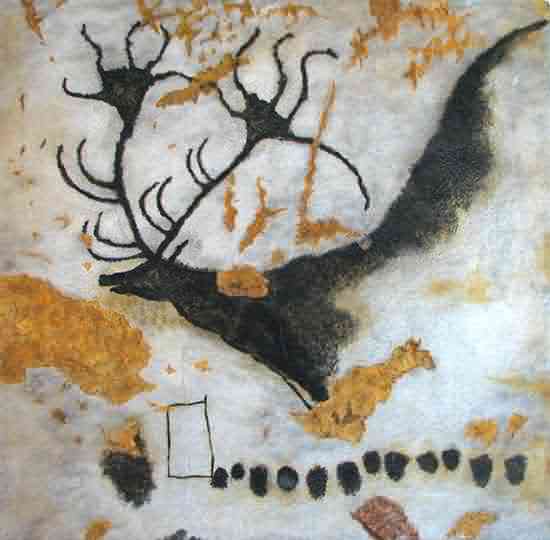
A painting of the Giant Deer from Lascaux
Source: Wikimedia Commons
Filed Under:
Guest Post
Tagged as: AlexAnndra Ontra, Death by PowerPoint, Geetesh Bajaj, Guest Post, James Ontra, PowerPoint, Presentation Management, Shufflrr
Microsoft and the Office logo are trademarks or registered trademarks of Microsoft Corporation in the United States and/or other countries.